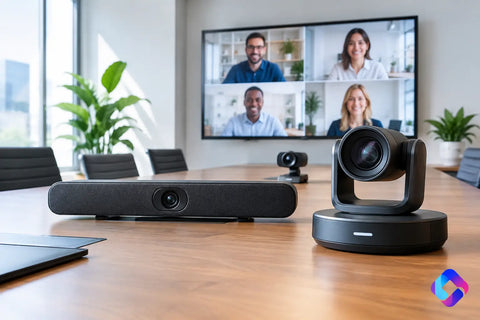
A conference room where remote attendees cannot hear the team is not a minor inconvenience. It slows decisions, frustrates clients, and makes even a polished office feel unprepared. This San Diego commercial AV guide helps business owners, property managers, and operators make better choices before equipment is purchased, walls are opened, or an installer arrives.
Commercial AV is more than a display on a wall. It is the working connection between people, content, sound, control, power, and network infrastructure. When those pieces are designed together, the system feels simple to use. When they are treated as separate purchases, the result is often a room full of expensive hardware that no one wants to touch.
Start With the Experience, Not the Equipment
The best starting question is not, "Which TV should we buy?" It is, "What should this space allow people to do without technical help?"
An office may need staff to walk into a room, connect a laptop, start a video call, and share content in under a minute. A restaurant may need music that remains even from the host stand to an outdoor patio, with separate volume control for each area. A retail location may need bright, centrally managed displays that support promotions without distracting from the customer experience.
Those use cases determine the right system. A small huddle room does not need the same camera, microphone coverage, or display size as a 16-person boardroom. A warehouse training area may prioritize speech clarity and durable equipment over presentation-grade video. A client-facing showroom may justify higher-end displays and hidden wiring because the environment is part of the brand.
Before design begins, define who uses the space, what they need to accomplish, which devices must connect, and who will support the system day to day. That conversation prevents two common problems: paying for features that go unused and omitting the features that employees rely on every day.
Build Commercial AV on a Reliable Network
AV performance often depends on infrastructure that visitors never see. Video conferencing, wireless presentation, streaming audio, digital signage, and remote management all place demands on the network. If WiFi coverage is inconsistent or switching capacity is undersized, even quality AV equipment will appear unreliable.
A commercial installation should account for structured low-voltage cabling, dedicated pathways, equipment ventilation, power locations, and network segmentation. For many businesses, AV devices should operate on an appropriate separate network or VLAN from guest WiFi and certain business-critical systems. The right approach depends on the size of the environment, the equipment in use, and the level of remote access required.
This is especially relevant when a project includes surveillance, door access, WiFi, and AV. These systems can share a thoughtfully designed network while remaining properly organized and secure. One integrator who understands the full picture can reduce finger-pointing between cabling, IT, security, and AV vendors when something needs attention.
Plan cabling before finishes are complete
Running cable after a build-out is finished is possible, but it is rarely the cleanest or most cost-effective option. During construction or renovation, plan data, video, audio, control, and conduit pathways before drywall, millwork, ceilings, and flooring are complete.
Conduit is valuable when future upgrades are likely. A display may be sufficient today, but a future room camera, secondary screen, or upgraded connection standard could require another cable route. Adding a practical pathway now provides flexibility without committing to unnecessary hardware.
Equipment should also have a designated home. That may be a properly ventilated rack, an AV cabinet, or a secure network closet. Hiding components behind a display can work in a simple application, but it becomes difficult to service when a room includes multiple sources, amplifiers, control hardware, and network devices.
Match the System to the Type of Space
Commercial AV should support the environment rather than follow a one-size-fits-all package.
Conference rooms and offices
For meeting spaces, camera framing, microphone pickup, speaker placement, and display size deserve equal attention. A large screen does not solve a poor conferencing experience if remote participants hear echo or see only half the room. Ceiling microphones may create a clean visual result in larger rooms, while an all-in-one video bar can be a practical choice for smaller spaces.
Ease of use matters as much as technical capability. Employees should not need to switch inputs manually, find remotes, or troubleshoot audio settings before every call. A simple touch controller, wireless presentation option, or well-designed one-touch meeting setup can make the room far more useful.
Restaurants, bars, and hospitality spaces
Audio should be designed in zones, not simply made louder. The dining area, bar, patio, restroom corridor, and private event room may each need different volume levels or content. Proper speaker spacing improves coverage and reduces the need for uncomfortable volume near individual tables.
Video planning should consider sightlines and ambient light. A display placed behind a sunlit window may look washed out during lunch service. For sports viewing or event programming, content distribution should be planned so staff can control what appears in each zone without moving cables or remotes between locations.
Retail, showrooms, and customer-facing spaces
Digital displays can promote products, communicate wait times, reinforce branding, or provide useful customer information. The display itself is only part of the decision. Consider brightness, operating hours, mounting height, content management, and how the screen will be serviced.
A consumer television may cost less upfront, but a commercial-grade display can be the better fit for long operating hours, portrait orientation, remote management, and warranty needs. The right choice depends on how heavily the display will be used and how costly downtime would be.
Warehouses and training environments
In large, noisy, or industrial environments, intelligibility takes priority. A system should make announcements and training material understandable without creating harsh, uneven sound. Durable enclosures, practical mounting locations, and cable protection may matter more than hidden hardware.
These spaces also benefit from centralized control. Managers may need to make an announcement, display safety information, or run a training session without relying on a complicated setup. Keeping controls clear and limited improves adoption.
Budget for What People Actually Notice
A strong AV budget is not simply a hardware list. It should account for design, wiring, mounting, network readiness, programming, installation, testing, and user training. Leaving out those items can make an initial proposal look attractive while shifting important costs later in the project.
Spend where failure would be most visible. In a conference room, that is usually audio quality and dependable connectivity. In a restaurant, it may be correctly zoned sound and intuitive source control. In retail, it may be display reliability and a clean installation that protects the customer-facing appearance of the space.
There are valid trade-offs. A smaller room may not require a dedicated control system if a straightforward video bar and display meet the need. A growing business, however, may benefit from extra cabling capacity and centralized management even if every feature is not activated on day one. The goal is not the most complicated system. It is a system that fits the operation now and can adapt when the business changes.
Choose an Integration Partner That Owns the Details
Commercial AV projects go more smoothly when the design team asks practical questions early: Where will power be available? What is above the ceiling? Who owns the network? Will furniture placement change? How will staff control the room? What happens when the internet connection drops?
A qualified integrator coordinates those details across trades and documents the finished system. That includes labeling cabling, organizing racks, testing all functions, and training the people who use the system. Clean workmanship is not only visual. It makes service faster, reduces confusion, and supports future changes.
Wall Street Networks provides end-to-end commercial technology integration for businesses that want networking, low-voltage infrastructure, security, and AV handled as one coordinated project. For San Diego offices, restaurants, retail locations, warehouses, and entertainment spaces, that means fewer vendors to manage and a clearer path from concept to deployment.
The most valuable commercial AV system is the one your team stops thinking about because it works when they need it. Schedule a free consultation before your next build-out or upgrade, and give the space a technology plan that supports the work happening inside it.