A conference room camera can make a well-run meeting feel disorganized when remote participants cannot see who is speaking, faces are backlit by windows, or the camera cuts to the wrong person. The best conference room cameras solve more than a video problem. They help distributed teams communicate naturally, present professionally to clients, and get more value from the rooms they already have.
For most offices, the right choice is not simply the camera with the highest resolution or longest feature list. Room dimensions, table layout, display placement, lighting, acoustics, network capacity, and the meeting platform all affect the result. A small huddle room has very different needs than a 14-seat boardroom with a wall of glass and multiple displays.
What Makes the Best Conference Room Cameras?
A strong conference room camera delivers clear framing without making users think about the equipment. It should start meetings quickly, keep participants visible as they move, and provide enough audio coverage that remote attendees do not have to ask people to repeat themselves.
Auto-framing is one of the most useful features for shared spaces. The camera recognizes the people in the room and adjusts the shot to include them. Speaker tracking goes a step further by shifting focus toward the active speaker. This can make hybrid meetings more engaging, but it is not always the right setting. In a fast-paced group discussion, constant camera movement can be distracting. Group framing is usually the more comfortable default for team meetings, while speaker tracking can work well for training, presentations, and executive briefings.
Resolution matters, but it should be viewed in context. A 4K camera gives the system room to crop and frame participants while maintaining a sharp image. However, poor lighting, a low-quality display, weak WiFi, or insufficient internet bandwidth can still make a 4K-capable camera look ordinary. Clean installation and reliable network design often have as much impact as the camera itself.
Audio is equally important. Many all-in-one video bars include beamforming microphones designed to focus on voices and reduce background noise. They are excellent for smaller rooms, but they have limits. Larger rooms, rooms with hard surfaces, or spaces with loud HVAC equipment may need expansion microphones, ceiling microphones, or dedicated DSP audio to produce consistently clear conversations.
Best Camera Type for Each Room
The best buying decision starts with the room, not the product catalog. The following categories cover most office environments and help clarify where an all-in-one device is enough and where a more complete AV design is justified.
Small huddle rooms: USB video bars
For rooms that seat two to six people, a USB video bar is often the most practical solution. Products such as the Logitech Rally Bar Huddle, Poly Studio R30, and Yealink MeetingBar options combine camera, microphones, speakers, and intelligent framing in a compact enclosure. They mount neatly above or below a display and can connect to a dedicated room computer or a laptop using a single USB cable.
This approach is a good fit for businesses that use Zoom, Microsoft Teams, or Google Meet from employee laptops. It keeps the setup familiar while improving the camera angle and audio dramatically compared with a laptop webcam.
The trade-off is room coverage. A small video bar does not belong in a long conference room simply because it is inexpensive. Once participants are sitting far from the display or beyond the microphone pickup range, users will experience the very issues the system was meant to eliminate.
Medium conference rooms: all-in-one meeting bars
Medium rooms seating six to 12 people are where all-in-one meeting bars become especially compelling. Devices such as the Logitech Rally Bar, Neat Bar Pro, Cisco Room Bar, and Poly Studio solutions can provide wide-angle video, automated framing, integrated speaker output, and microphones designed for a larger pickup area.
These systems are a strong match for organizations that want a polished, appliance-style meeting room rather than a laptop-dependent setup. Depending on the platform, a meeting bar may run Teams Rooms or Zoom Rooms directly, allowing users to join meetings with a touchscreen controller instead of connecting a personal computer every time.
A dedicated room system creates a more consistent experience. The display wakes, the controller presents the meeting schedule, and users join with one touch. That consistency matters in client-facing offices, shared conference rooms, and any workplace where people should be able to start a meeting without calling IT.
Large boardrooms: modular cameras and audio
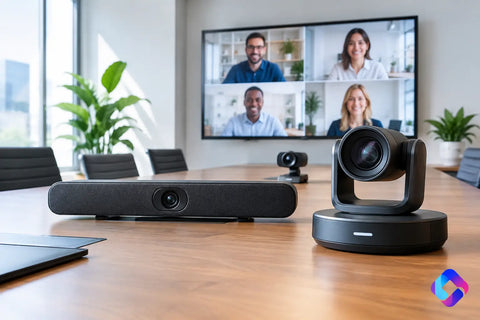
Large conference rooms require more planning. A single soundbar-style device may provide an acceptable image from the front of the room, but it can struggle to capture people at the far end of a long table. In these spaces, a PTZ camera with optical zoom is often the better choice. It can frame the entire room for group discussions and zoom closer to the speaker or presentation area when appropriate.
Modular systems also allow the audio system to match the room. Ceiling microphone arrays, tabletop microphones, and professional speakers can be positioned to cover every seat without filling the table with visible equipment. For rooms with divisible walls, multiple displays, or more than one camera angle, a control system can simplify operation behind a single touch panel.
This is where installation quality becomes highly visible. Cameras should be mounted at a natural eye line, displays should be sized for the viewing distance, and cables should be concealed and properly labeled. A boardroom should look intentional, not like a collection of devices added over time.
Features Worth Paying For
The best conference room cameras are not necessarily the most expensive, but several features consistently improve real-world use.
Wide field of view is essential in smaller rooms where participants sit close to the display. In larger rooms, optical zoom is more valuable than an extremely wide lens because it preserves detail when framing people farther away. Digital zoom can help, but it crops the image and can reduce clarity.
Intelligent framing is worth prioritizing when different group sizes use the same room. Some systems can frame the entire group, create individual participant tiles, or recognize a presenter at the front of the room. Before selecting a camera, consider how meetings actually happen. A design team gathering around a whiteboard has different framing needs than a weekly sales review around a table.
Privacy controls deserve attention as well. Look for a physical shutter, a clear camera-in-use indicator, or both. These details help employees and guests feel comfortable in shared spaces, especially in rooms that may be used for sensitive conversations.
Finally, choose equipment that supports the platforms your team already uses. A Teams Rooms system is designed around Microsoft Teams. A Zoom Rooms system is designed around Zoom. USB-based systems offer greater flexibility for laptop users but rely more heavily on each person’s computer and meeting habits. There is no universal winner. The right model depends on whether consistency or platform flexibility is the higher priority.
Do Not Overlook the Network and Room Infrastructure
A high-quality camera cannot compensate for an unreliable network. Video meetings place steady demands on internet connectivity, switching, WiFi coverage, and device configuration. If calls drop, audio breaks up, or the room controller loses its connection, users will blame the conference room system even if the camera is working correctly.
For wired room systems, a dedicated data drop at the display location is the preferred approach. It provides a stable connection for the meeting appliance, controller, and any managed AV equipment. Where WiFi is necessary, the access point should be planned around room occupancy, construction materials, and competing devices, not simply placed wherever there is an available outlet.
Power and cable pathways should be addressed early, especially during an office renovation or build-out. A professional low-voltage installation can hide power, HDMI, USB, control, and network cabling while leaving room for future upgrades. This avoids the common sight of cords running across a credenza or bundled behind a display.
Lighting also deserves a site review. Windows behind participants can cause silhouettes, while recessed lights directly above the table can create unflattering shadows. Simple changes such as window shades, better fixture placement, or adjusted camera position often improve video quality more than replacing hardware.
A Practical Selection Process
Start by measuring the room and noting the farthest seat from the display. Then identify the primary meeting platform, the number of regular participants, whether the room hosts outside clients, and whether people commonly present at a whiteboard. Those answers narrow the field quickly.
For a small office huddle room, an all-in-one USB bar connected to a display may be the right balance of cost and performance. For a frequently used client conference room, a dedicated Teams Rooms or Zoom Rooms system can create a more dependable experience. For a larger executive room, combine a PTZ camera, properly designed audio, multiple displays when needed, and a simple room controller.
Wall Street Networks helps businesses plan and install conference room AV systems that fit the space, the way teams work, and the underlying network. The goal is not to add technology for its own sake. It is to make every meeting easier to start, easier to hear, and easier to trust.
The camera that earns its place in your conference room is the one employees stop noticing because every person on the call can see, hear, and participate without friction.