A missing key, a late-night lockout, and a tenant who moved out three days ago can create far more work than they should. The best smart locks for rentals replace key-copy uncertainty with controlled access, time-based codes, and a clear record of who entered and when. For landlords and property managers, the right lock is not necessarily the most expensive model. It is the one that fits the door, works reliably for residents, and does not create a support problem every time batteries need changing.
A smart lock should also fit the property’s operating model. A single-family rental has different needs than a multifamily building, furnished corporate housing, or a short-term rental with frequent turnovers. Start with how access is managed, then choose the hardware and platform that support it.
What makes a smart lock rental-ready?
Rental properties benefit most from locks with a physical key override, a reliable keypad, clear low-battery alerts, and the ability to create and remove individual access codes remotely. WiFi can be useful for off-site management, but it also introduces a network dependency. Bluetooth-only locks can conserve battery power and simplify setup, yet they may require a nearby bridge for remote code changes.
Before selecting a model, confirm the door’s backset, thickness, handing, and existing bore-hole layout. A standard tubular deadbolt is generally straightforward. Mortise locks, narrow-stile doors, historic doors, and fire-rated commercial openings require more careful planning. On multifamily properties, building rules and master-key systems may also limit what can be changed.
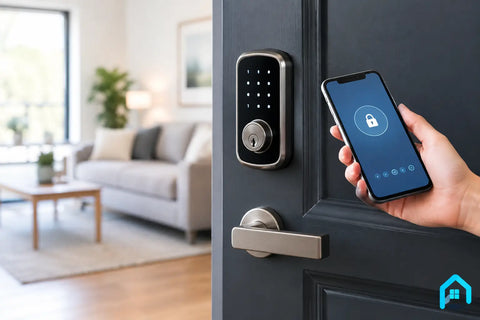
For most rentals, a keypad is more practical than relying on a phone app alone. Residents can enter with a code even when their phone battery is dead, and a property manager can issue access to cleaners, contractors, or prospective tenants without distributing keys.
7 best smart locks for rentals
1. Schlage Encode Smart WiFi Deadbolt
The Schlage Encode is a strong fit for landlords who want remote management without adding a separate hub. Its built-in WiFi lets an owner create, change, or delete codes from off-site, making it especially useful for single-family rentals and furnished units. The keypad is familiar, the mechanical key backup is reassuring, and Schlage’s hardware has a long-standing reputation in residential doors.
The trade-off is battery demand. WiFi locks use more power than Bluetooth models, so regular battery checks and tenant communication matter. It is also a full deadbolt replacement, which may be less attractive where preserving original door hardware is a priority.
2. Yale Assure Lock 2
Yale Assure Lock 2 is a flexible choice for properties with different smart-home preferences. Depending on the version, it can support WiFi, Bluetooth, Apple Home, Z-Wave, or Matter-based environments. That range is useful when a property already has an established platform or when the owner wants to avoid being tied to one ecosystem.
For a conventional long-term rental, the keypad version with a physical keyway offers the broadest safety net. The key-free version looks clean and removes the risk of copied keys, but it demands disciplined battery maintenance and a clear emergency-access plan. Choose the connectivity option based on the property’s actual network and management needs, not on a feature list alone.
3. Kwikset Halo Touch or Halo Keypad
Kwikset Halo models work well for owners who value straightforward remote code management and a familiar residential lock format. The Halo Touch adds fingerprint access, while keypad versions keep entry simple for families, guests, and service providers. Both can be practical for newer rental homes where the goal is a clean upgrade from a standard deadbolt.
Fingerprint access is convenient for an owner-occupied home, but it is not always the deciding feature for a rental. Keypad access is easier to administer across tenant changes and does not require collecting or enrolling biometric data. For most property managers, the standard keypad model is the more operationally efficient option.
4. Level Lock+ or Level Bolt
Level products are designed for properties where appearance matters. A Level Lock+ can preserve a traditional lock profile, while Level Bolt fits inside many existing deadbolts so the exterior hardware may remain in place. That makes these options worth considering for higher-end rentals, design-focused residences, and doors where a large touchscreen keypad would look out of place.
The compromise is that discreet hardware can mean less obvious guest access. If tenants, cleaners, and vendors need codes that are easy to use without an app, a visible keypad remains more practical. Level is best when the property has controlled users, reliable mobile access, and a reason to retain a specific hardware aesthetic.
5. Schlage Encode Plus
For rentals using Apple Home and iPhone-based access, Schlage Encode Plus adds support for Apple home keys alongside a keypad and traditional key backup. Residents can use compatible Apple devices for entry, while management can still issue codes when a phone is unavailable. It is a polished option for premium furnished rentals and homes where Apple Home is already part of the technology plan.
Its value depends on the tenant profile. If the property turns over frequently or hosts residents with mixed phone preferences, the Apple-specific convenience should be treated as a bonus rather than the core access method. The keypad remains the universal tool that keeps move-in day simple.
6. August Wi-Fi Smart Lock
August is often a sensible answer for rentals where replacing exterior hardware is not allowed. It mounts on the interior side of many existing deadbolts, allowing the property to retain the original exterior key cylinder and street-facing appearance. This can reduce approval issues in condos and managed buildings.
Because the original deadbolt remains, key control may not improve as much as it would with a full replacement. A tenant can still have a physical key copied unless the cylinder is rekeyed or otherwise managed. August is best for a property with hardware restrictions, not for an owner trying to eliminate key distribution altogether.
7. UniFi Access with compatible door hardware
For small multifamily properties, offices, retail spaces, or mixed-use buildings, consumer smart locks can become difficult to manage at scale. A managed access control system such as UniFi Access is built for doors that need credentials, schedules, audit trails, and centralized administration. It can support key cards, mobile credentials, intercom workflows, and controlled access across multiple openings.
This is not a drop-in replacement for a residential deadbolt. It requires compatible locking hardware, power, network planning, and professional installation. But for a property manager overseeing common doors, staff access, package rooms, or commercial tenant entries, it provides a more appropriate long-term foundation than several unrelated WiFi locks.
Choose connectivity based on management, not marketing
A lock connected directly to WiFi is convenient for a small portfolio because it enables remote updates without an extra hub. The downside is more battery use and greater reliance on a stable wireless signal at the door. Poor WiFi at an entryway can turn a smart lock into an inconsistent one.
Z-Wave, Matter, Bluetooth, and Apple Home options can work very well when they are part of a planned automation system. They are less ideal when the lock is being installed as a stand-alone device with no hub, no reliable network coverage, and no one responsible for maintaining the system. A professionally designed WiFi network can solve many access issues before they become tenant complaints.
For larger properties, keep access control separate from a resident’s personal internet service whenever possible. Building-owned network infrastructure, properly placed access points, and documented administrator accounts prevent a lock from becoming unavailable when a tenant changes a router password or moves out.
Installation details that prevent expensive mistakes
Smart lock installation is more than matching a deadbolt to a hole in a door. The bolt must align cleanly with the strike plate. If the door sticks, sags, or requires force to latch, the motor works harder and battery life suffers. Correcting door alignment first is often the difference between a reliable lock and repeated service calls.
Use quality alkaline batteries unless the manufacturer specifically permits another type. Set a written battery replacement schedule, test the physical key override, and keep an emergency credential process for authorized management staff. Do not leave default administrator codes in place, and remove former tenants promptly at turnover.
On fire-rated doors and commercial openings, confirm that the selected lock and installation method maintain the door assembly’s required rating and egress function. Entry security should never interfere with a resident’s ability to exit quickly and freely.
The right lock is the one your team can support
The best choice is usually a keypad deadbolt for a standard rental home, an interior retrofit lock where exterior hardware cannot change, or managed access control for properties with multiple doors and users. Hardware should follow the door, network, tenant experience, and access policy - not the other way around.
Wall Street Networks can help property owners align smart locks, reliable WiFi, surveillance, and door access into one system that is easier to manage. A well-planned installation gives residents a simple way in and gives owners fewer reasons to make an emergency key run.