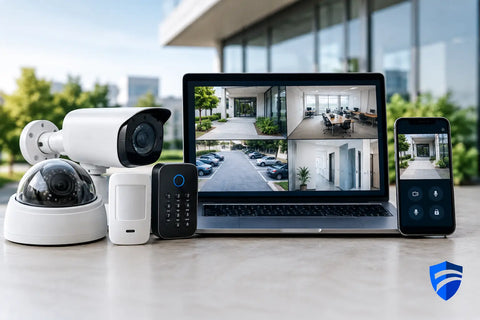
A camera mounted over the front door is useful. A door lock you can manage from your phone is useful. Reliable WiFi is useful. But security technology becomes far more valuable when those systems are designed to work together around the way a property is actually used.
For a homeowner, that may mean receiving a video alert when a delivery arrives, checking the driveway while away, and giving a trusted service provider temporary access without handing out a key. For a business owner or property manager, it can mean knowing who entered a restricted area, reviewing a clear video record after an incident, and keeping security devices online when the network is under pressure.
The difference is not simply the equipment. It is the planning behind it.
Security Technology Starts With the Property
Security is not a one-size-fits-all package. A townhouse, restaurant, warehouse, retail store, and multi-unit property have different entry points, operating hours, visibility challenges, and privacy considerations. The right system begins with a site-specific conversation, not a list of products.
A residential plan may focus on front and rear entrances, garage access, perimeter coverage, package deliveries, and discreet indoor monitoring where appropriate. A commercial plan may need to account for staff entrances, loading zones, customer areas, cash-handling locations, inventory rooms, and after-hours access.
Camera placement is a good example. More cameras do not automatically create better coverage. A poorly placed camera can miss faces, capture harsh glare, or produce footage that is difficult to use. A properly designed camera plan considers sightlines, lighting, mounting height, weather exposure, recording quality, and the distance needed to identify a person or vehicle.
The same principle applies to access control. A single exterior door may only require dependable remote entry and activity logs. A larger office, warehouse, or managed property may need different permission levels for employees, tenants, contractors, and administrators. The system should match how people move through the building, not force the building to adapt to the technology.
The Network Is Part of the Security System
Modern cameras, access readers, intercoms, smart locks, and alarms all depend on the network. When that foundation is overlooked, even excellent security hardware can become unreliable.
A camera that frequently disconnects cannot provide dependable coverage. An access control system on a weak wireless connection can create frustration at the door. Poorly organized cabling and unmanaged switches also make troubleshooting slower when something needs attention.
For many properties, wired connections are the preferred choice for fixed security equipment. Structured low-voltage wiring provides stable connectivity, supports power-over-Ethernet devices, and keeps installations cleaner than relying on individual power adapters and scattered wireless connections. It also makes future expansion easier if a property later adds cameras, door stations, wireless access points, or additional access-controlled doors.
Wireless devices still have a place, especially where running cable is impractical. The trade-off is that WiFi coverage, battery management, signal strength, and network configuration need to be evaluated carefully. A good installer will explain where wireless makes sense and where a wired connection is worth the investment.
Network segmentation can add another layer of control. Keeping security devices separate from guest WiFi, personal devices, and business workstations helps organize traffic and can limit the impact of a compromised or misconfigured device. This is particularly valuable for businesses that process payments, manage client information, or support multiple employees on the same network.
Cameras Should Deliver Useful Answers
The most common question after an incident is simple: what happened? A surveillance system should make that answer easier to find.
That means choosing cameras for the job. A wide-angle camera may be ideal for covering a backyard, lobby, or dining area, while a tighter field of view may be better for identifying activity at a gate or doorway. Low-light performance matters in parking areas and side entrances. Outdoor cameras need to be selected and mounted for local weather conditions, not just installed wherever there is an available surface.
Recording is equally important. Cloud storage offers convenient remote access and can reduce the need for local hardware, but recurring costs and internet dependency should be considered. Local recording can provide more control over retention and may continue recording during an internet outage, depending on the system design. Many properties benefit from a combination of local recording and secure remote viewing.
There is also a balance between alerts and noise. Motion alerts set too broadly can turn every passing car, tree branch, or employee arrival into a notification. Smart detection zones and person, vehicle, or package recognition can make notifications more meaningful. The goal is not to receive more alerts. It is to receive the right alerts.
Access Control Creates Accountability
Traditional keys are difficult to track. They can be copied, misplaced, or kept long after a tenant, employee, or contractor no longer needs access. Access control replaces that uncertainty with manageable credentials and activity records.
For homes, this may look like smart locks, video doorbells, gate controls, and entry systems connected to a single app. For businesses, it may include key cards, mobile credentials, PIN codes, door schedules, and audit trails that show when a door was opened and by whom.
The right level of control depends on the property. A small office may need one managed entry door and a way to remove access when staff changes. A restaurant may need separate access for managers, kitchen staff, delivery areas, and ownership. A warehouse may require stricter control at inventory rooms, offices, and loading entrances.
Emergency operation must also be part of the design. Doors need to meet applicable life-safety requirements, and the system should be planned around what happens during a power interruption, network outage, or fire alarm event. Security should protect the property without creating barriers for safe exit.
Integration Should Make Daily Use Easier
The best integrated systems reduce the number of apps, remotes, and workarounds a property owner has to manage. That does not mean every device needs to be connected to every other device. Over-integration can create unnecessary complexity.
Instead, focus on useful connections. A video intercom can show who is at the door before access is granted. A door event can pull up the related camera view. A homeowner can check cameras and control entry from the same interface used for other smart home functions. A property manager can review access activity and video from one organized platform rather than switching between disconnected systems.
Compatibility deserves attention before equipment is purchased. Some platforms offer broad support for cameras, smart home devices, and voice assistants. Others work best within a specific ecosystem. Neither approach is automatically better. Open compatibility can provide flexibility, while a more unified platform can simplify management. The right choice depends on the property's priorities, budget, and expected future upgrades.
Professional Installation Protects the Investment
Security equipment is visible, but much of the quality of an installation is behind the walls, above ceilings, inside network racks, and in the configuration details. Clean cable routes, labeled connections, secure mounting, appropriate power, and documented network settings all affect long-term reliability.
Professional deployment also includes testing the system under real conditions. Can the camera identify a visitor at night? Does the door reader respond consistently? Is remote viewing available when the owner is off-site? Are staff members or family members comfortable using the controls? These details separate an installed system from a system that truly supports the property.
Wall Street Networks approaches security as part of the larger technology environment. That means considering surveillance, access, WiFi, switching, structured wiring, automation, and AV together when the project calls for it. One coordinated plan can prevent the frustration of adding separate systems over time with no clear owner for the overall design.
Plan for Change, Not Just Opening Day
A property rarely stays static. A family may add a detached office or renovate a yard. A business may hire more staff, expand into another suite, change operating hours, or add a delivery entrance. Planning capacity early can make those changes less disruptive and less expensive.
During a consultation, ask what can be expanded later, how footage is stored, who controls administrator access, and what happens if internet service goes down. Also ask whether the system is simple enough for the people who will use it every day. Advanced features have little value if no one knows how to manage them.
The most effective security plan is one that fits the property now, leaves room for what comes next, and gives you clear control when it matters most.